
Know your Zoom F8n (Pro)
Know your Zoom F8n (Pro)
To improve readability, we will refer to the Zoom F8n and Zoom F8n Pro as the 'F8n' for short. Any differences between the models will be mentioned explicitly.
This is about one of our most frequently used recorders and contains some tips and tricks that you may find in the manual, if you can understand the engineer's perspective.
As it is also useful to have as a cheat sheet, it will be made into a downloadable tutorial. We will start with this article, and once it is ready, it will be converted into a tutorial.
F8n-settings on your SD cards
The F8n offers powerful yet hidden functionality. Presets! Or, as they're called in the F8n: "Backup/Load Settings".
We won't explain how to access this feature on your F8n, but we will explain how to use it to its fullest potential. For the details, please look in your manual for "Backing up and loading F8n (Pro) settings (Backup/LoadSettings)"
The magic happens afterward.
Once you format an SD card, all settings will be deleted. In our opinion, this is a design flaw in the firmware, but that's just the way it is.
Once you return home from the set, you should always start a "3-2-1 backup" of your recorded files. You should also copy the settings from the settings folder into a "common" settings folder.
This is an example of one of our SD cards for a F8n.
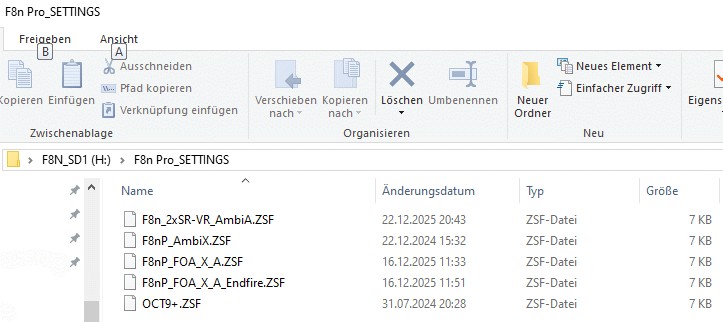
As we also still have an Zoom F8n we keep the F8nP as a leading tag. But you may change this on your on decision.
After formatting an SD card, you should copy the contents of the "common-settings" folder into the "settings" folder on the newly formatted SD card. This will be useful for future jobs. You simply copy the *.ZSF files into the F8n_settings folder of the SD card.
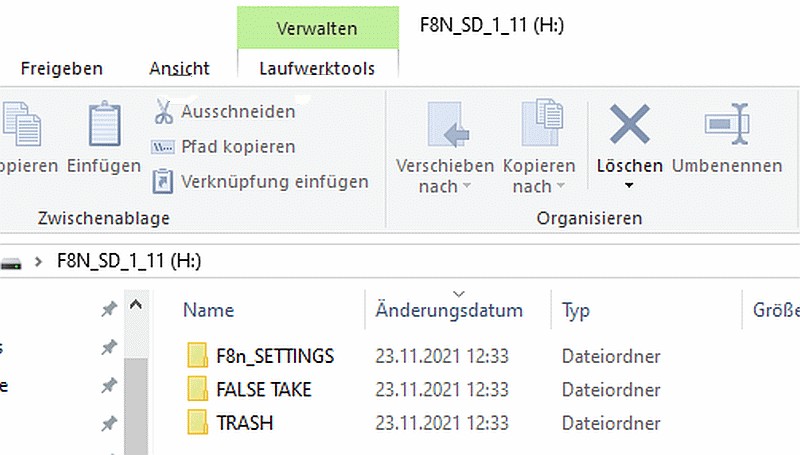
This will not only make the setup of your F8n a breeze, but ensure a constant workflow, naming and order of channel for the use in post.
You should also read:
Know your knowledge
Know your knowledge You know this for sure: You read something somewhere, but a week later, you're no longer completely sure about the details. There is so much to learn about ambisonics and related topics, and even more to discover. When we first entered this…
Continue reading...Name your recordings!
Name your recordings Recording is a creative process, and it's easy to get caught up in the flow and forget something very important: Name your recordings! But not with “Rec1,” “RecA,” “Take001_20251115.” You might remember where everything is until you return to the studio at…
Continue reading...
Mark your gear
Mark your gear It is not always possible to stick a sticker with the company logo on the surface of hand cases, suitcases or on any part of your gear. Even on tool cases, these stickers do not usually stick very well. So we stick…
Continue reading...Know you gear!
Know you gear! "Know your gear!" should be a sticker on every sound engineer's bags. This is both simple and true! Many of the available articles, tips and tricks originate from this. We recommend that every junior sound engineer take the time to get to…
Continue reading...Zoom F8n pro
Zoom F8n Pro As its name suggests, it is the successor to the Zoom F8n. The most notable "innovation" is the "32-bit float" feature. Now, you can record with 32-bit float and not worry about your gains anymore. (within reasonable limits). Aside from that, there…
Continue reading...